
DuckConvert · · Updated
Stop Leaking Secrets: Use a Local Base64 Tool
As developers, we constantly deal with Base64 encoding. Whether it's embedding a small image into CSS, formatting an authorization header (like HTTP Basic Auth), or decoding a JSON Web Token (JWT) payload, Base64 is unavoidable.
The fastest way to decode a string is usually to search for a "Base64 Decoder" online.
The Security Flaw
Pasting your Base64 strings into online tools is a massive security vulnerability. Base64 is an encoding format, not encryption.
If you paste an encoded API key, database connection string, or a JWT containing sensitive user data into a server-backed tool, that server can read everything in plaintext. You are trusting a random, ad-supported website not to log your proprietary credentials.
The DuckConvert Solution
We built our Base64 Encoder & Decoder specifically to solve this problem.
- 100% Client-Side: The encoding and decoding process happens entirely within your browser using native JavaScript APIs (
btoaandatob). Your data never touches a server. - UTF-8 and Emoji Support: Unlike basic implementations that break on special characters, our tool uses
TextEncoderandTextDecoderto perfectly handle complex UTF-8 characters and emojis. - Instant Feedback: Results appear in real-time as you type or paste.
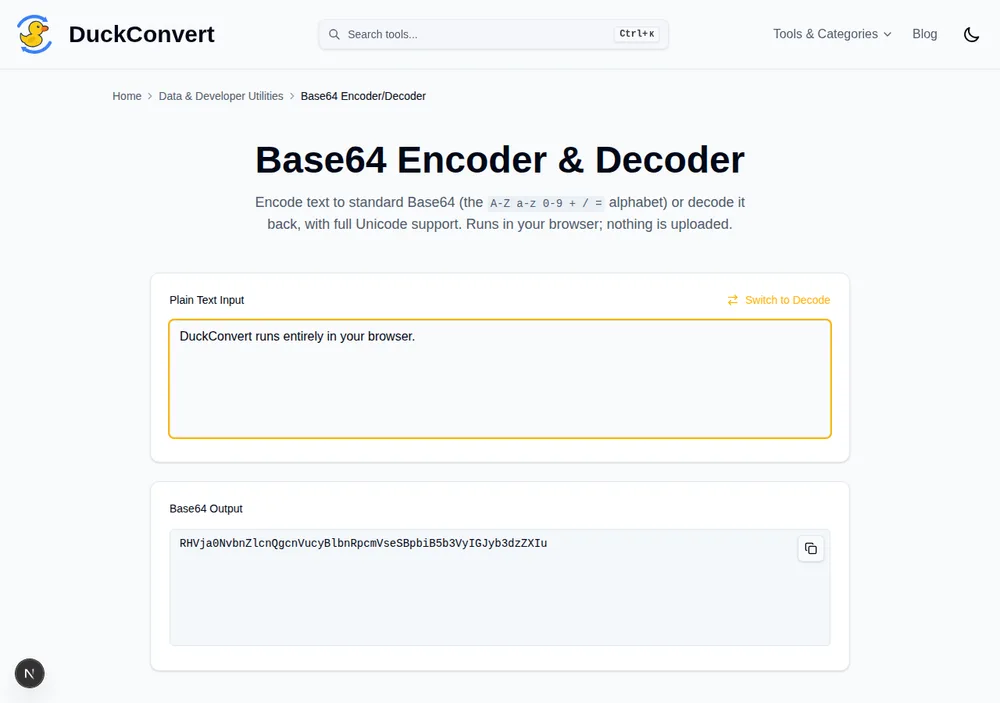
Typed on the left, encoded on the right — nothing leaves the tab.
Secure Your Workflow
Make client-side tools a standard part of your development workflow. Keep your keys, tokens, and data secure.
Bookmark our Base64 Encoder & Decoder for your next project.
How Base64 actually works
Base64 exists because a lot of systems were built to move text, not arbitrary bytes. Email headers, JSON string fields, XML documents, HTTP headers and data URIs all expect printable characters, and raw binary would either be mangled in transit or terminate the field early.
The encoding takes three bytes, 24 bits in total, and re-cuts them into four
groups of six bits. Six bits can hold 64 distinct values, which is where the
name comes from, and each of those values maps to one character from a 64-symbol
alphabet: A-Z, a-z, 0-9, + and /. When the input does not divide
evenly into three-byte groups, the encoder pads the output with one or two =
characters so the length is always a multiple of four.
Two useful consequences fall out of that. First, the output is always about a third larger than the input, since every three bytes become four characters. That is why inlining an image as a data URI in CSS costs you roughly 33% over serving the file. Second, an encoded string's length modulo four tells you whether it was truncated, which is often the quickest way to diagnose a malformed token.
The variant that breaks decoders: base64url
The standard alphabet includes + and /, and both are awkward in a URL. +
means a space in form encoding and / is a path separator. So a variant called
base64url swaps them for - and _, and usually drops the = padding
entirely.
This matters the moment you touch a JSON Web Token, because JWTs use base64url
throughout. Paste a JWT segment into a decoder that only implements the standard
alphabet and you get either an error or subtly corrupted output, depending on
whether the particular token happened to contain any of the differing
characters. A token that decodes correctly on Monday and fails on Tuesday is
almost always this: the second token simply happened to contain a -.
Reading a JWT, and why that should worry you
A JWT is three base64url strings joined by dots: a header, a payload, and a signature. Decode the middle segment and you get the claims in plain JSON, which typically includes the subject, the issuer, an expiry timestamp, and whatever else the application chose to put there, sometimes email addresses, roles or internal identifiers.
The signature does not hide any of that. It only proves the token was not altered after being issued. Anyone holding the token can read every claim in it without a key, which is the single most important thing to understand about the format, and the reason a token should never carry anything you would not be willing to show the holder.
It is also exactly why pasting one into a remote decoder is worse than it looks. The operator does not merely see an opaque string; they see your issuer, your user identifiers and a token that may still be valid for hours.
Why btoa alone is not enough
The browser's built-in btoa predates widespread Unicode on the web and only
accepts characters in the Latin-1 range. Hand it any text containing a curly
quote, an accented letter, a CJK character or an emoji and it throws an
InvalidCharacterError rather than encoding it.
The correct approach is to convert the string to UTF-8 bytes first, with
TextEncoder, and encode those bytes. Reversing the process means decoding to
bytes and running them back through TextDecoder. Implementations that skip
this step appear to work fine right up until someone pastes in a name with an
accent in it.