
DuckConvert · · Updated
The Best Way to URL Encode Strings
When working with REST APIs, handling webhooks, or building complex query parameters, you must ensure your data is properly URL encoded (also known as percent-encoding).
Failing to encode special characters like spaces, ampersands (&), or question marks (?) can break URLs and cause your applications to fail silently or route requests incorrectly.
The Danger of Online Tools
Like many developer utilities, the top search results for "URL Encoder" are often server-backed websites. If you are encoding a URL that contains:
- Secure access tokens
- Email addresses
- Proprietary tracking parameters
...you are handing that sensitive data over to a third party simply by pasting it into their form.
DuckConvert: Fast and Local
Our URL Encoder & Decoder provides a secure, instantaneous, and strictly local alternative.
By leveraging native browser APIs (encodeURIComponent and decodeURIComponent), our tool processes your strings exactly as standard web technologies expect, conforming strictly to RFC 3986 standards.
Because the processing happens on your machine, there is zero latency, and zero risk of your parameters being logged in a remote server's access logs.
Try It Now
Ensure your web requests are robust and your data remains private. Use our free, client-side URL Encoder & Decoder for your development needs.
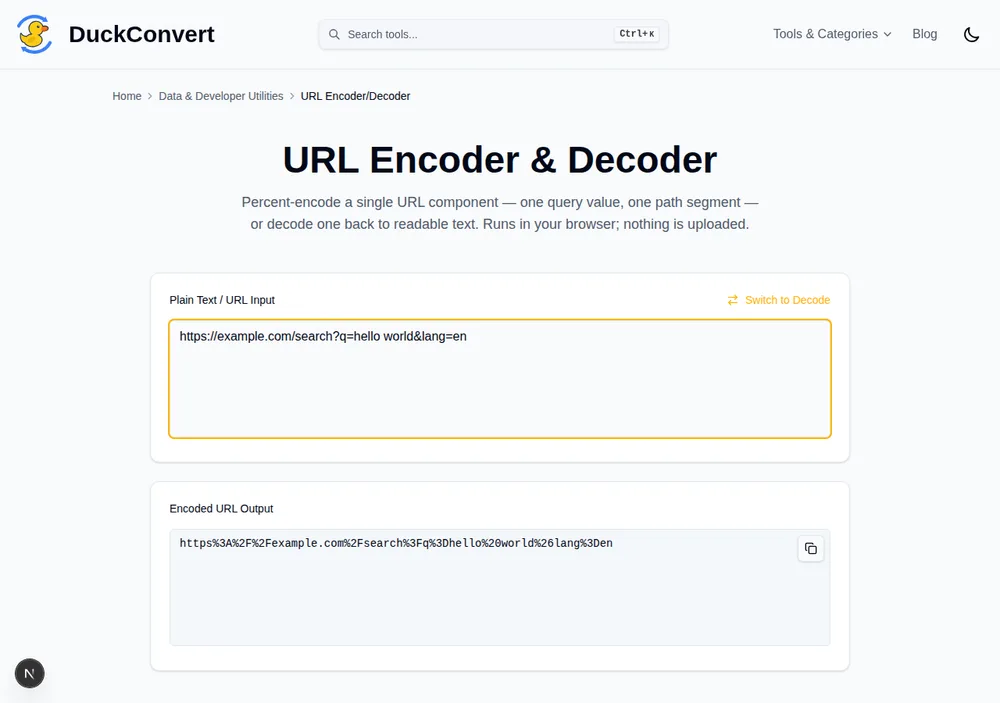
A real URL with a space and an & in it, percent-encoded on the spot.
Three different kinds of encoding, and picking the wrong one
"URL encoding" is not one operation. JavaScript exposes two functions that behave differently, and HTML forms use a third convention on top of both.
encodeURIComponent escapes everything that is not unreserved, including /,
?, #, & and =. That is what you want for a single value going into a
query parameter, because those characters would otherwise be read as structure
rather than data. encodeURI deliberately leaves them alone, because it is
meant for escaping a whole URL that already has its structure in place.
Reach for the wrong one and the failure is quiet. Encoding an entire URL with
encodeURIComponent turns https://example.com/a?b=c into a string where the
scheme separator and the query marker are themselves escaped, producing
something no server will route. Encoding a single value with encodeURI leaves
an embedded & intact, so a value like Ben & Jerry silently splits into two
parameters and the second half of the name vanishes.
The third convention is form encoding. When a browser submits a form as
application/x-www-form-urlencoded, a space becomes + rather than %20. Both
are correct in a query string and both are widely accepted, but a decoder that
only understands %20 will hand back a string still containing plus signs, and
a decoder that always converts + to a space will corrupt a genuine plus in an
email address or a phone number.
What actually gets escaped
RFC 3986 divides characters into unreserved, which never need escaping, and
reserved, which carry structural meaning. The unreserved set is small and worth
memorising: A-Z, a-z, 0-9, and the four characters -, ., _ and ~.
Everything else is either reserved or has to be percent-encoded.
Percent-encoding itself is simple. Each byte is written as a percent sign
followed by two hexadecimal digits, so a space is %20 and a forward slash is
%2F. Non-ASCII text is converted to UTF-8 first and then each of those bytes
is escaped individually, which is why an accented character takes two escapes
and an emoji takes four. That is the correct behaviour, not a bug: é becomes
%C3%A9 because those are the two bytes UTF-8 uses to represent it.
Double encoding, and how to recognise it
The most common URL bug in production is encoding something twice. A percent
sign is itself a reserved character, so encoding an already-encoded string
escapes its escapes. A space becomes %20 on the first pass and %2520 on the
second, because the % in %20 becomes %25.
You can spot it by eye once you know the shape. %2520 in a log or an address
bar always means the value went through an encoder one time too many, usually
because a framework already encoded a parameter and application code encoded it
again on the way out. The fix is to decode once and check whether the result
still looks encoded before doing anything else.
Decoding twice is the mirror image, and more dangerous. A value that legitimately
contains the literal text %20 gets turned into a space it never had, which is
the basis of a family of path-traversal and filter-bypass attacks against
software that normalises input more times than it validates it.